GWS Structure
Overview
The GWS can be found in the /gws/pw/j07 directory on JASMIN, and is split into two volumes - ncas_obs_vol1 and ncas_obs_vol2. Within these volumes are directories for each of the AMOF atmospheric observatories, one for mobile instruments, and one for FAAM, with amf (soon to be mobile), bttao, cdao, cvao, faam, iao, and wao in ncas_obs_vol1, and cao in ncas_obs_vol2. Each of these observatory directories have a number of folders for raw data, processed data, software, and sending data to the CEDA archive.

Raw Data
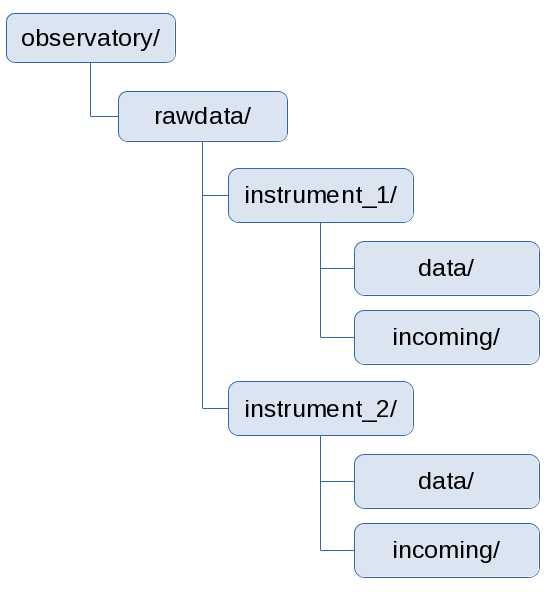
Raw data is the data that comes out of the instrument, prior to any processing or calibration work. Within this folder is a directory for each instrument associated with the observatory, using the instrument’s unique AMOF instrument name. These instrument folders contain two folders:
incoming- a writeable directory for raw data to be uploaded into. Once the instrument scientist is happy the data is correct, it is moved into thedatadirectory and made read only.data- read-only directory containing raw data from the instrument. Within this folder, data should be split into folders related to the project the data relates to, in the format<start_date>_<project_name>(see Project Folder for more information).
Software
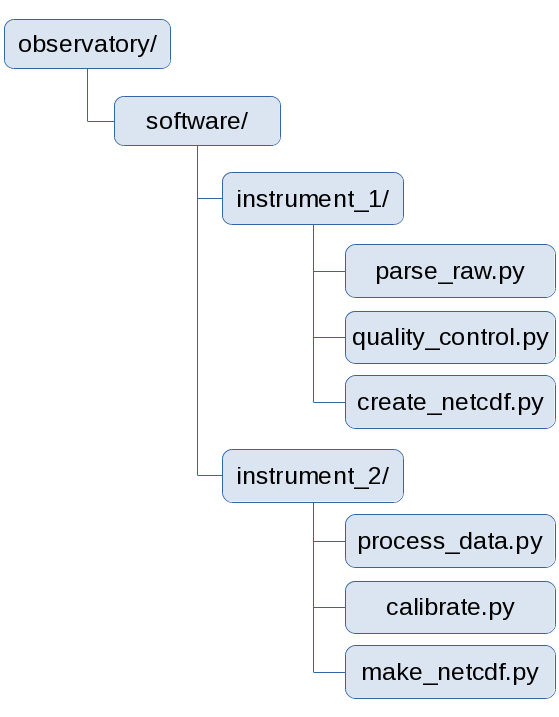
A directory for code used for processing raw data. Each instrument has it’s own folder, which is linked to the instrument software repository on GitHub. This code should contain all the processing needed to prepare the raw data into a format ready for ingestion to the CEDA archive, and should be version controlled through GitHub to aid in traceability in data workflow, and any re-processing that may need to be done.
Processing
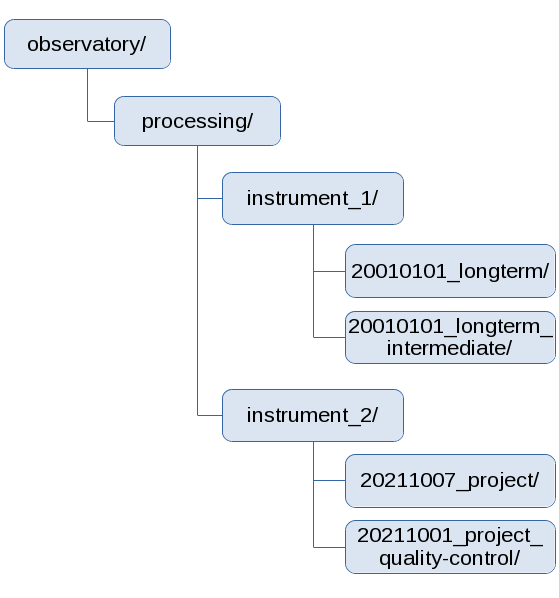
A folder to be used in the preparation of data for ingestion to the CEDA archive. While the instrument scientist can mostly arrange the instrument folders to suit their workflow, it is recommended the project folder is used prepended to folder names to aid in traceability, for example 20010101_longterm_quality-control.
Files that are ready to sent to the CEDA archive using the Upload to CEDA tool must be in a folder with the project folder naming convention directly beneath the instrument folder, i.e. processing/<instrument_name>/<project_folder>/. Within this folder, files must be separated into folders by date in the format yyyy/mm/dd, using as many date layers as appropriate (for example, daily files may only need yyyy/mm folders).
Tools
This directory stores tools and code that can be used to plot and manipulate processed data. Code for each instrument can be arranged as the instrument scientist wishes, and should be backed up to the instrument tools repository on GitHub.
Additional Data
A folder for storing additional information and documents related to instruments, for example manuals and calibration certificates. Each instrument directory is linked to the instrument additionaldata repository on GitHub.
Upload
A holding area for data that is ready to be ingested into the CEDA archive. Data should be moved here from the processing directories using the Upload to CEDA tool.
Logs
A directory for log files. These log files could be (for example) related to the transfer process from instruments to JASMIN, log outputs from processing the raw data, or information about power at the observatory. This directory can be defined and used as required.
Public
A link to the public HTML space for the observatory. This space could be used for sharing small files or latest quick look data plots from the instruments.
GWS_scripts
This directory should be used for storing scripts that used within the group workspace. This would include scripts that pull raw data from instruments to JASMIN, as well as some scripts for creating new directories when new instruments are added.
Project Folder
In a number of places throughout the GWS, instrument data is stored within a project folder, which is named in the format <start_date>_<project_name>. This project folder helps to keep related data together through the GWS, and helps place it in the right place when uploaded to the CEDA archive.
<start_date>is the first date on which the instrument was booked on a deployment for a project, regardless of when data was first collected during that campaign, and must be in YYYYmmdd format.<project_name>is the name, or abbreviated name, of the project during which data was collected. In the case of long term observations taken at an observatory unrelated to a specific project,longtermshould be used for static instruments (i.e. instruments that are part of the observatory) or the abbreviated observatory name (e.g.iao) for mobile instruments.